CRM Integration
Your CRM stops being a place people forget to update.
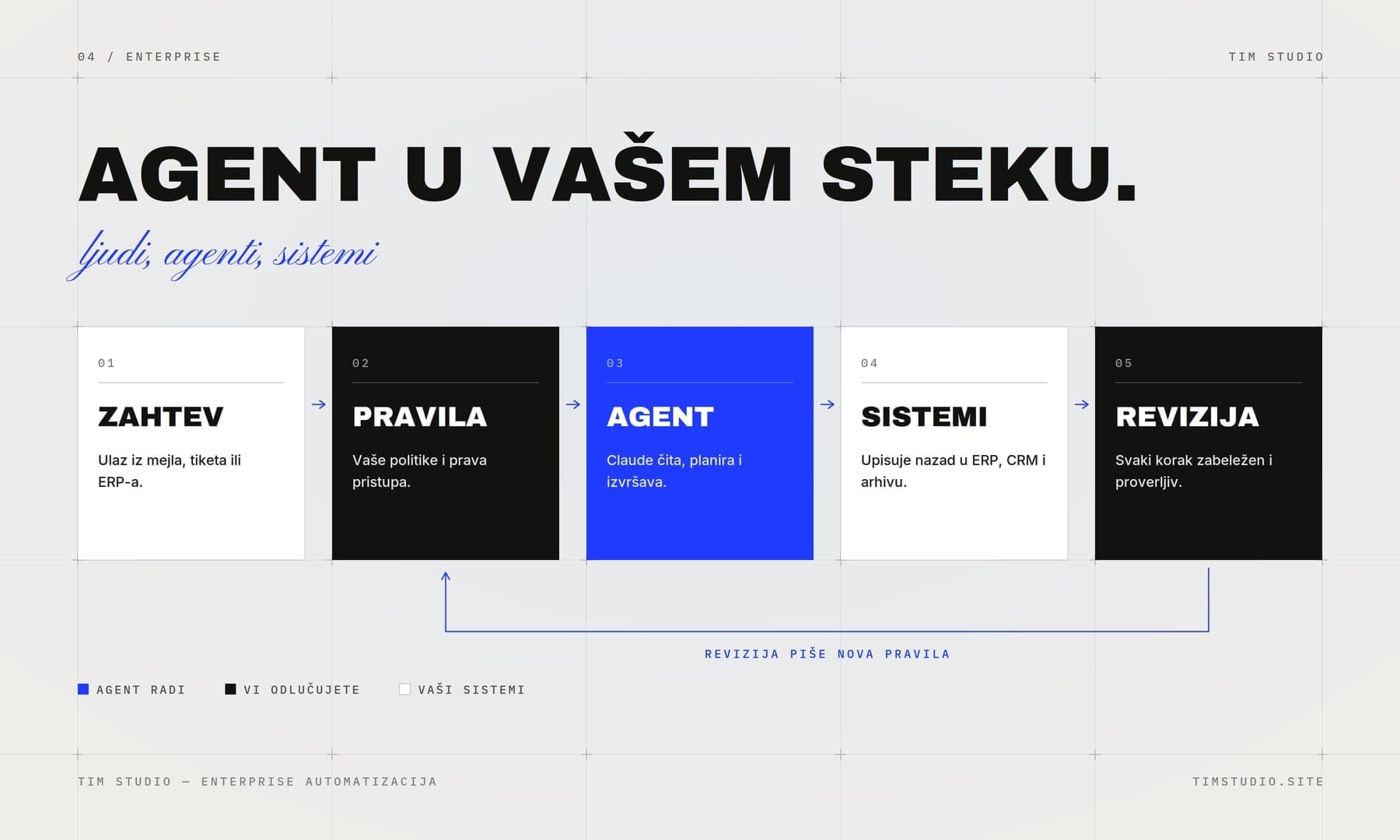
From the work: Enterprise AI
an agent in your stack
An example architecture, not a named client: a request comes in, your rules bound it, the agent reads, plans and executes, the systems are written back to, and every step stays logged and auditable.
Most CRMs fail not because of the software, but because the data never arrives on its own. We connect your CRM to the tools that actually create the records: your website forms, calendar, email, billing, and chat, so every lead and deal lands in the right place without anyone typing it in. You get one accurate view of every contact, and your team gets their afternoons back.
TIM Studio works from Novi Sad in Serbia, remotely, in English and Serbian, for companies in the UK, the EU and the US, and at home across Serbia, Croatia, Bosnia and Herzegovina and Montenegro.
What you get
A two-way sync between your CRM and the tools your team already uses (HubSpot, Pipedrive, Salesforce, Zoho, or the one you run)
Automatic lead capture from website forms, landing pages, and chat, with source and campaign data attached to every record
Calendar and email logging so calls, meetings, and replies are written to the contact without manual entry
Field mapping and deduplication rules that keep one clean record per person and company, no more duplicates or conflicting data
Pipeline automation: stage changes, task creation, owner assignment, and follow-up reminders triggered by real activity
A short written handover covering the data model, every connection, and what to check if something looks off
How the work runs
Audit and map
We review your current CRM, the tools around it, and how your team actually works, then map every field, source, and trigger before writing a single connection.
Connect and clean
We build the integrations, set deduplication and field rules, and clean the existing records so the CRM starts from accurate data, not a mess.
Automate the pipeline
We add the logic that moves deals, assigns owners, logs activity, and prompts follow-ups, so the CRM reflects reality without manual upkeep.
Test and hand over
We run real data through every path, fix the edge cases, and leave you with documentation and monitoring so the system keeps running after we step back.
Before you ask
We work with HubSpot, Pipedrive, Salesforce, Zoho, and Close most often, and we can connect to any CRM with an API or a supported automation layer. We tell you upfront if your setup has a real limitation, before you commit.
No. We build and test on a copy or in a staging environment first, run deduplication carefully, and migrate in a controlled window. Your team keeps working in the CRM throughout, and we confirm every record before going live.
We set up monitoring and error alerts so a failed sync is caught early, not weeks later. The handover document tells you exactly what each connection does, and we offer ongoing support if you want us to own maintenance instead of your team.
Write to us.